
Product
How Wakefence ZeroSOC works
A security operations team as software, connected to the Microsoft security tools you already own. It investigates every alert, acts within the boundaries you set and keeps a person informed and in control.
From alert to verdict
Every alert gets a real investigation
When Microsoft Defender raises an alert, Wakefence ZeroSOC gathers the evidence from your own tools: sign-ins, mailbox activity, devices, the history of the accounts involved. It tests the competing explanations, the innocent ones too, and reaches a verdict with its reasoning in under two minutes.
Every step lands on the Case timeline, the attacker's actions and the response side by side, so anyone can follow what happened and why.
- Recorded event02:29Lena signs in from Munich on her own laptop.
- Attacker action03:09Sign-in from Lagos with a stolen session token; no MFA prompt is shown.
- Attacker action03:11An inbox rule starts forwarding invoices to an outside address.
- Alert03:14Microsoft Defender XDR raises "Unfamiliar sign-in properties".
- Investigation03:15Sign-ins, mailbox and laptop checked; travel, VPN and a delegated assistant ruled out. Verdict: malicious.
- Action03:15Inbox rule disabled, pre-approved and reversible.
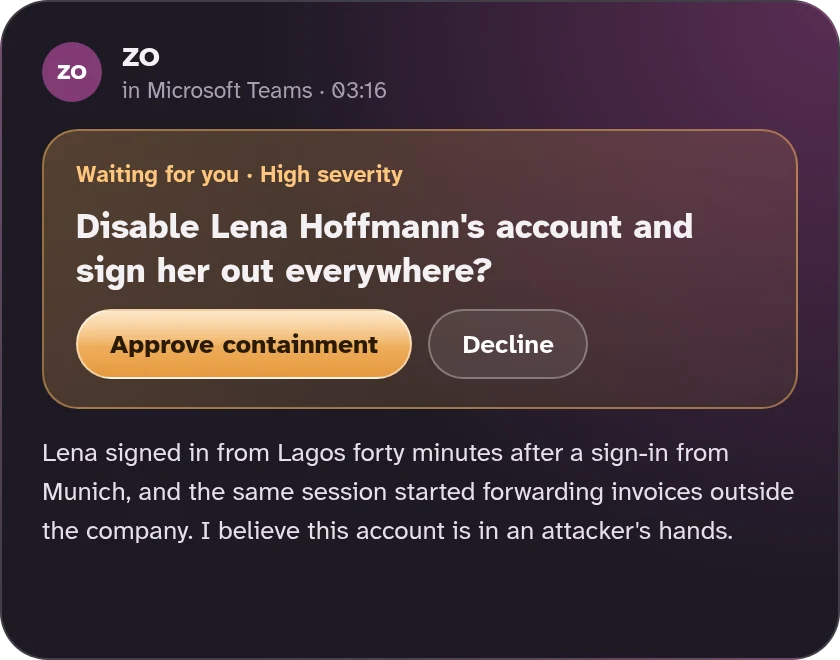
- Approval03:16Disabling the account is proposed; waiting for an answer in Teams.
Decisions where you already work
A brief in Teams, a call when it matters
ZO, the voice of Wakefence ZeroSOC, brings each decision to Microsoft Teams: what happened, what it found, what it proposes, and one tap to approve or decline.
When something cannot wait and nobody answers, it phones your contacts in the order you choose until someone acknowledges. Every morning, a short brief says what was handled overnight and what still needs you.
The portal
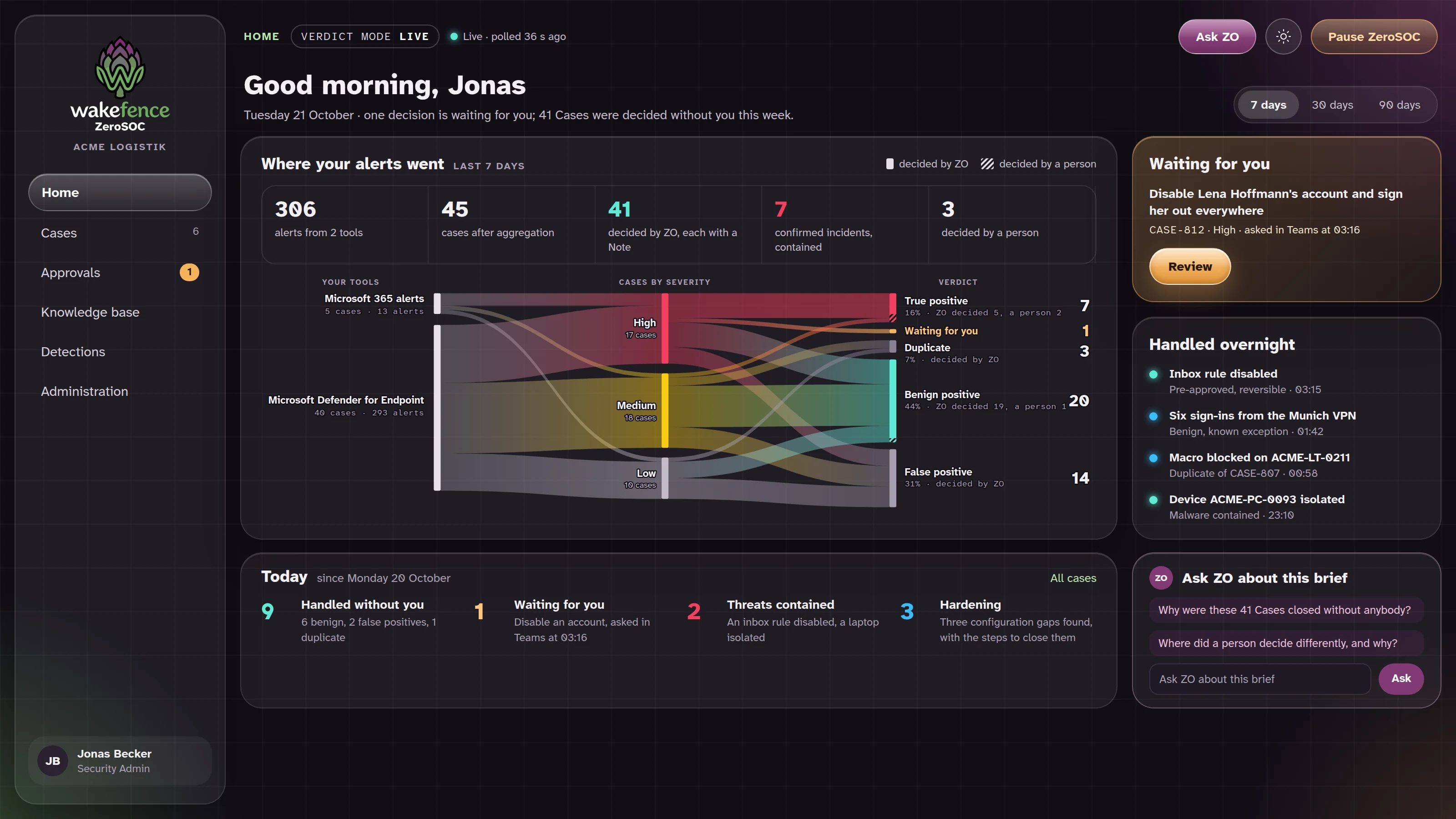
The whole week on one page
Where every alert went, how many Cases ZO closed on its own and which ones a person decided, what is waiting for you and what was handled overnight. Ask ZO about anything on the page, in plain words.
Within the boundaries you set
It acts, and you stay in control
You decide which actions Wakefence ZeroSOC may take on its own and which wait for a person, and you widen that freedom at your own pace.
Business-critical stays yours
Systems and people you mark as business-critical always need explicit approval.
Reversible actions
Containment is chosen so that it can be undone, from the portal or from Microsoft Entra and Defender.
A pause on every screen
One tap stops every automatic action until you resume it.
A complete record
Every proposal, approval and action is recorded with who decided and why.
More than alert handling
Protection that grows over time
ZeroSOC Detect
Our own detections on top of Microsoft's, starting with identity: suspicious sign-ins and risky changes in your Microsoft 365 audit log become alerts like any other.
A knowledge base that learns
Your critical systems, what normal looks like, the exceptions you approved. It grows with every Case, belongs to you and can be exported at any time.
The Advisor
Between incidents it reviews your Microsoft security configuration, maps the gaps to NIS2 and explains how to close them, coaching your IT team as it goes.
Works with
The Microsoft security stack you already have
Wakefence ZeroSOC needs Microsoft 365 with Microsoft Defender. Each customer gets a dedicated instance on Microsoft Azure in the EU, and the portal, the briefs and the calls speak English, Italian and German.
- Microsoft Defender XDR and Microsoft Defender for Endpoint: alerts, incidents, devices and response actions.
- Microsoft Entra ID: sign-ins, accounts and their containment.
- Microsoft Purview audit log: the activity behind identity detections.
- Microsoft Teams: briefs, approvals and conversations with ZO.
- Your phone: escalation calls to the contacts you choose.
See it on your own tenant
In a 30-minute call we show Wakefence ZeroSOC at work on a Microsoft 365 tenant: how it investigates alerts, the verdicts it reaches and the decisions it brings to you.